How I Spent $100 With No Result But Learned a Lot
A brutally honest account of trying to fine-tune a vision-language model into a browser agent over one weekend.
It started with a release note. Google dropped Gemma 4 12B and I read the architecture section more carefully than usual. Most vision-language models are built around a heavy separate encoder — a SigLIP or CLIP model that processes images into embeddings, which are then handed off to the language model. Two models, two weight sets, two inference pipelines stitched together. Gemma 4 is different: it has no separate vision encoder. Vision understanding is baked directly into the unified model weights. One model, one forward pass, image tokens processed natively alongside text.
That’s when the idea formed. Browser automation tools today are mostly DOM-parsers — they read HTML structure, find elements by CSS selector, click by node ID. Brittle, maintenance-heavy, blind to anything rendered in canvas or injected by JavaScript. A vision-first approach would see the page the way a human does: pixels. No DOM access needed. If the button is on screen, you can click it, regardless of how it’s implemented.
Previous VLMs had a practical problem for this use case: the heavy encoder made fine-tuning expensive and the two-stage architecture added complexity. A model with vision built in natively — especially at 12B parameters, a size that fits on a single A100 — felt like it might finally be the right fit.
Not a DOM-parsing bot. Not a brittle CSS-selector script. A model that sees the page the way a human does, and figures out what to do from the pixels alone.
I had a GPU budget from Modal and a long weekend. Let’s go.
The Setup
The model: Gemma 4 12B Instruct — encoder-free, instruction-tuned VLM. Vision is native to the architecture: image tokens flow through the same transformer as text, with no separate image-embedding stage. Brand new at the time of this experiment. I could hand it a screenshot and ask “what should I click next?” and it would actually try to answer.
The plan: fine-tune it on human web-navigation traces using LoRA so the fine-tuned model outputs structured action calls (mouse_click(x, y), keyboard_type(text), goto(url)) instead of conversational responses.
The hardware: Modal cloud GPUs, one A100-80GB. At roughly $4/hour, I had a comfortable runway. Or so I thought.
Choosing the Dataset (Or: Why the “Obvious” Choice Was Wrong)
My first instinct was Mind2Web — the most cited web-navigation dataset in papers. I’d seen it referenced everywhere. I pulled it down, started inspecting the screenshots, and immediately saw the problem.
The screenshots are 5,429 pixels tall.
Not 1080. Not 1200. Five thousand four hundred and twenty-nine pixels. They’re not browser screenshots at all — they’re full-page DOM renders, capturing the entire page in a single image. In a real browser, you’d only ever see the top portion. 23% of the labeled target elements are below y=800, which means they’re invisible in any real viewport. The dataset was built for HTML-parsing agents, and someone stapled screenshots on as an afterthought.
I almost used it. Imagine fine-tuning a model to click elements that aren’t visible on screen.
The alternative I found was allenai/MolmoWeb-HumanTrajs, released by Allen AI just a few months earlier. Real Chrome extension. Real human annotators. Real viewport screenshots. 36,000 trajectories, 623,000 individual steps, 1,100+ websites. Apache 2.0 licensed. The only open-source dataset of its kind — every competitor (Holo1, UI-TARS) keeps their training data proprietary.
Dataset chosen. Infrastructure next.
Building on Modal (Or: How Many Ways Can a Cloud Job Die?)
I’d used Modal before but never for a multi-hour fine-tune. Turns out there are many creative ways for a long-running GPU job to die:
Death by RAM. My first attempt at building the training dataset stored screenshots as decoded PIL images — each one is about 1.1MB in memory. 2,000 trajectories × 12 steps × 1.1MB = 26GB of RAM, just for the dataset. Python politely ran out and died. The fix: store JPEG bytes (75KB each) and decode them on-the-fly per batch in the data collator. The same data now fits in 1.8GB.
Death by batch shape. Gemma 4’s image processor has a subtle API: you must pass images as [[img1], [img2], ...] (a nested list, one image per text item). Pass a flat list and it interprets the whole batch as multiple images for a single text item, crashes with a cryptic inconsistently sized batches of images (8) and text (1) error. This one cost me a full run.
Death by volume commit. Modal volumes only persist data when you explicitly call volume.commit(). I didn’t know this. The trainer saved checkpoints to /output, the job ran for three hours, the container shut down, and every checkpoint was silently gone. I had to add a custom callback — VolumeCommitCallback — that called volume.commit() after every save.
Death by download timeout. One run just… never started. It sat for six hours “downloading the dataset.” HuggingFace’s Arrow streaming doesn’t support random-access slicing — asking for split="train[0:2000]" materializes all 36,000 rows before slicing. Without a timeout set, it hung forever. Fix: HF_HUB_DOWNLOAD_TIMEOUT=120 and a persistent hf-cache volume so subsequent runs skip re-downloading.
Death by terminal close. modal run keeps the container alive only as long as your local process runs. Close the terminal, container dies. The workaround is nohup modal run src/train.py & — survives terminal close, but not machine shutdown. I learned this the hard way at 11pm.
By the time I’d patched all of this, I’d lost about five runs to infrastructure and was genuinely questioning my life choices. But the training config was solid. Time to actually train.
Run 12: The Cruelest Kind of Failure
After all those infrastructure problems, Run 12 actually completed. Six hours on the A100, loss dropped beautifully from 10.67 to 0.176. Token accuracy hit 94.6%. Train and eval loss tracked each other the whole way — no overfitting. By any training metric, this was a clean, successful run.
I ran the eval.
Fine-tuned model: 1/20 valid actions. Base model (no fine-tuning): 20/20 valid actions. I had trained a model that was dramatically worse than doing nothing.
Staring at that number for a while, I started looking at the raw outputs. In 19 of 20 cases, the fine-tuned model produced only this:
I see the WolframAlpha page. I am clicking on the search box to enter my query.
Just prose. No action call at all. The model had learned to narrate what it saw — and then stop.
The base model, meanwhile, was doing this:
call:mouse_click(x, y, button='left')
thought
call:keyboard_type(text='Madrid')
thought
call:keyboard_press(key='Enter')
thought
[repeats 6 more times]
Completely unusable — placeholder coordinates, looping endlessly — but technically “valid” by the metric because it contains action keywords. A model that outputs mouse_click(x, y) with the literal letters x and y scores higher than a model that writes beautiful prose. Metrics are treacherous.
The Root Cause Hunt
Once I stopped being annoyed and started being curious, the bug was obvious in retrospect.
Three misalignments, none visible until you look at the actual training labels. The system prompt said coordinates are normalized to [0, 100]. Every single training example had raw pixel coordinates. I’d told the model one thing and trained it on another. Compounding bugs: training targets wrapped in <think>...</think> XML tags added yet another format the model had to get exactly right, and scroll_at was missing from the system prompt even though MolmoWeb uses it constantly.
When a student gets contradictory signals from their teacher, they eventually give up on the confusing part and just do what they understand — which was generating the descriptive thought text, something the training data also included. That’s exactly what happened.
I built src/preflight.py specifically to catch this class of bug going forward: a 10-minute, $0.30 Modal smoke test that checks action name coverage, coordinate conventions, decodes and prints the actual training labels, and runs 5 training steps + one inference pass before committing to a full run. If preflight passes, the $35 run is probably fine. If it doesn’t, you find out in 10 minutes instead of 6 hours.
Run 13: The Fix Works
I fixed the three bugs, pointed the checkpoint directory to a new folder so it wouldn’t auto-resume from Run 12, and launched again.
| Metric | Run 12 | Run 13 | Base model |
|---|---|---|---|
| Action valid | 1/20 (5%) | 19/20 (95%) | 20/20* |
| Output actually usable | 0/20 | 19/20 | 0/20 |
The base model scores 20/20 on “action valid” because it outputs action keywords — but all 20 have placeholder coordinates and 7 loop into multi-action chains. The fine-tuned model produces one clean, grounded, schema-correct action call per step. The base model’s 100% is a metric artifact.
Sample fine-tuned output:
I have entered “Berlin” as the origin and “Madrid” as the destination. I see the Departure input field is active, and I am clicking it to open the calendar.
mouse_click(x=500.0, y=412.0, button='left')
Clean reasoning, one action, real coordinates. It works. The core proof-of-concept is real: you can fine-tune Gemma 4 to output structured browser actions from screenshots.
One known gap at this stage: Run 13 was stateless. Each training sample was an independent (screenshot, task) → action pair with no knowledge of what had already been done. The MolmoWeb data has full trajectory history per step — I just wasn’t using it yet. That would be the next thing to fix.
The QLoRA Attempt (Or: When the Community Has Moved On)
I’d been training in full bfloat16. The model weights alone are 24GB. Fine-tuning at bf16 means keeping the entire 24GB in GPU memory plus optimizer states, activations, gradients — you need the full 80GB A100.
The ML community had a better answer: QLoRA (Quantization + LoRA). Quantize the base model to 4-bit (6-7GB instead of 24GB), train LoRA adapters in bf16 on top. Multiple 2023-2024 papers showed it matches full LoRA quality with a fraction of the memory. Everyone was doing it.
I rewrote train.py with BitsAndBytesConfig(load_in_4bit=True, bnb_4bit_compute_dtype=bfloat16, bnb_4bit_quant_type="nf4"), ran preflight, and hit the wall.
NotImplementedError: "LayerNormKernelImpl" not implemented for 'Byte'Not on load. The model loaded fine, 7.7GB, 331 quantized tensors — exactly as expected. The crash happened on the first training forward pass, in Gemma 4’s vision tower.
The crash is architectural, not configurable. Gemma 4’s vision tower has a line hidden_states = self.patch_ln1(pixel_values.to(self.patch_dense.weight.dtype)). In normal operation this casts pixel values to bfloat16. But when you quantize with BitsAndBytes, patch_dense is stored as uint8. So .weight.dtype returns uint8. Pixel values get cast to uint8. nn.LayerNorm has no CUDA kernel for byte tensors. The architecture was released after QLoRA became standard, and apparently no one at Google tested the combination.
Tried Unsloth (a library that patches these issues) — hit dependency conflicts that had no PyPI resolution against the transformers version I needed. Tried llm_int8_skip_modules to exclude the vision tower from quantization — too many unknown parameters, too much risk, and I already had a working baseline.
The QAT Pivot
If 4-bit quantization breaks Gemma 4 at training time, but deployment at full precision is wasteful — is there another path?
Google had actually already solved this. They publish official QAT (Quantization-Aware Trained) checkpoints: google/gemma-4-12B-it-qat-q4_0-unquantized. The name is a mouthful but the idea is elegant: they trained quantization-awareness into the pre-training process, then extracted the weights as plain bfloat16. Same architecture, same loading code, same 24GB footprint at fine-tuning time — but because the weights experienced simulated quantization during pre-training, you can quantize them aggressively after fine-tuning without quality loss.
The training crash precondition is structurally absent: no Linear4bit, no uint8 storage dtype, patch_dense.weight.dtype is bfloat16. The thing that crashed can’t crash.
I also added DoRA and rsLoRA to the LoRA config — two technique upgrades from 2023-2024 that work on any base model regardless of precision. DoRA decomposes weight updates into magnitude and direction components (roughly +1% quality). rsLoRA adds rank-stabilized scaling for better convergence. Both are essentially free improvements layered on top.
Run 14 also fixed the stateless gap from Run 13: each training sample now includes the last 10 prior actions as "Previous actions:" in the prompt. This was a known weakness — Run 13 saw only the current screenshot and task, with no knowledge of what had already been tried. The MolmoWeb data has full trajectory history per step; Run 13 discarded it. Run 14 uses it.
Preflight ran clean on the first attempt. No crashes, 5 smoke-train steps completed, valid action output. Run 14 launched.
Run 14: The Real Results
Evaluated on 20 held-out trajectories (314 steps total) the model had never seen:
| Metric | Baseline (QAT, no adapter) | Run 14 fine-tuned | Change |
|---|---|---|---|
| Action valid | 285/314 (91%) | 308/314 (98%) | +23 |
| Action match | 126/314 (40%) | 209/314 (67%) | +27 pp |
| Coords valid | 203/314 (65%) | 113/314 (36%) | −29 pp |
| Has reasoning | 32/314 (10%) | 314/314 (100%) | +90 pp |
| Coord L2 (px) | 326 | 303 | −23 px |
Action match went from 40% to 67% — the model correctly identifies what to do at each step two-thirds of the time, up from two-fifths. Every single response now includes chain-of-thought reasoning before the action. Slight improvement in coordinate precision on steps where coords are present.
The regression: coordinate validity dropped. The fine-tuned model generates fewer click/scroll steps and more out-of-range coordinates. This is the next thing to fix — likely a coordinate normalization issue (Allen AI’s own MolmoWeb recipe normalizes to [0,100], not raw pixels; we’re probably making the regression target harder than it needs to be).
Model weights — The fine-tuned adapter and merged model are public on HuggingFace: medelharchaoui/gemma4-12b-browser-agent-run14. Includes the LoRA adapter, merged bf16 weights, and eval_run14_results.json with full per-step eval details.
What Does “$100 With No Result” Actually Mean?
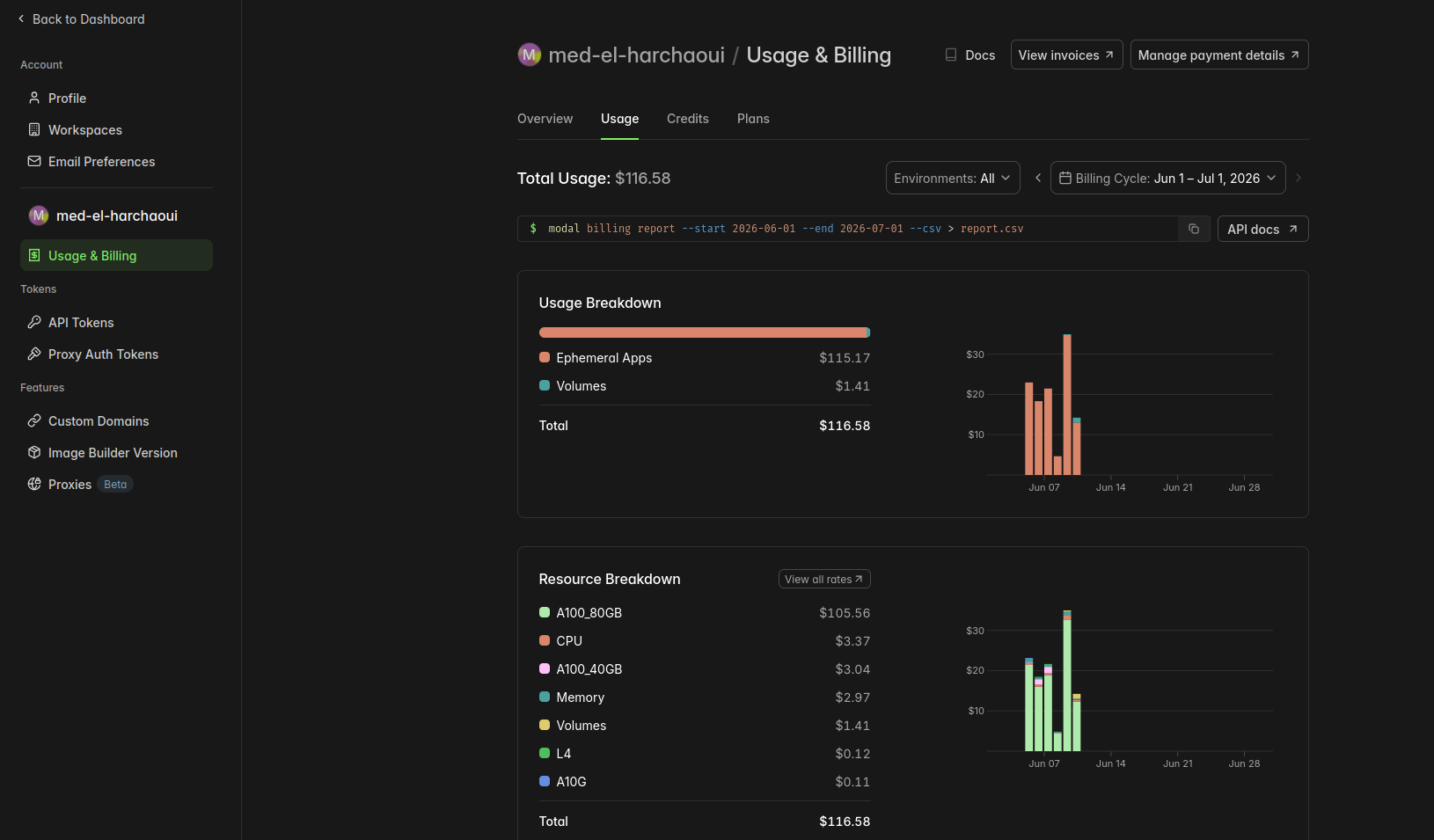
| Run | Cost | Outcome |
|---|---|---|
| Runs 1–11 | ~$40 | Infrastructure bugs, zero usable outputs |
| Run 12 | ~$25 | Completed training, model was broken |
| Run 13 | ~$25 | First working model |
| Run 14 | ~$20 | QAT fine-tune + history, 67% action match |
| Total | $116.58 | One working model |
Was it a result? Depends on what you were expecting. I have a model that correctly identifies the right action at a given web navigation step two-thirds of the time, generates coherent reasoning before every prediction, and outputs clean executable function calls instead of placeholder garbage. That’s real.
But it won’t autonomously complete a task from start to finish. Coordinate precision is still rough. And 67% action match on a 10-step trajectory means the probability of completing it perfectly is around 2%.
Working proof-of-concept, not a product. One hundred dollars of learning.
What I’d Do Differently
Normalize coordinates to [0, 100]. Again, Allen AI’s convention. Raw pixel values create a regression target that varies with screen resolution. A 100-point scale doesn’t. We fixed the format mismatch going into Run 13 but introduced a harder problem.
Run a preflight check for everything. The preflight.py script I built after Run 12 would have caught the coordinate mismatch in 10 minutes for $0.30 instead of in 6 hours for $35. Build the diagnostic before the full run, always.
Don’t assume community techniques transfer without testing. QLoRA works on most models. It doesn’t work on Gemma 4. The right response to “everyone is doing this” is “let me verify it works on my specific setup” — and the right tool for that verification is a cheap preflight run, not a $35 gamble.
What This Actually Tells You
Measurement is the first thing to get right. The base model scored 20/20 “valid actions” and was completely unusable — looping, placeholder coordinates, wrong schema. The fine-tuned model scored 1/20 and was generating fluent prose. A metric that rewards output format over output utility will systematically mislead you. This isn’t an ML-specific problem. It’s a general one about what you decide to count.
Clean training curves don’t mean the model learned the right thing. Loss dropped from 10.67 to 0.176. Token accuracy hit 94.6%. The model was broken. Format and capability are two separate problems, and format is the easier one to accidentally solve first.
The cost of a missing diagnostic is asymmetric. The Run 12 bug was a one-line contradiction between a system prompt and the training data. It would have been visible in 10 minutes for $0.30. Instead it cost $35 and 6 hours. Build the cheapest possible check that would catch the most likely failure mode — before any expensive run, not after.
“Everyone is doing this” is a description of the past, not a proof it applies to your setup. QLoRA is the 2024-2026 community standard. It doesn’t work on Gemma 4. New architectures break old assumptions silently. Verify first.
The format problem is solved. The hard problems aren’t. Fine-tuning a vision-language model to output structured browser actions from screenshots is achievable at modest cost. The grounding problem — right coordinates — and the reasoning problem — right action type — are not solved by format training. Those require scale, trajectory history, and a different training objective. This experiment draws the line clearly between what a few hundred dollars can buy and what it can’t.
The browser agent isn’t done. But it works, and I know exactly why it doesn’t work better.
That, it turns out, is worth $100.
Training scripts and source code: medelharchaoui/gemma4-12b-browser-agent-run14 on HuggingFace.